Configuring Associated Tools
Depending on your use cases and design choices, you might choose to associate your notes with one or more CygNet Studio tools. Such tools can be used as an interface with notes, enabling the display of notes applicable to a particular part of your system. For instance, notes can be deployed with trends so that operators can better record significant system events and communicate with other operators in a shared location.
Currently, notes can be associated with one or more of the following CygNet Studio tools:
- Trend Tool
- Note Feed Tool
The Trend Tool can be used by itself or in conjunction with some combination of other associated tools. For instance, a Trend Tool can be supplemented by a Note Feed Tool. The Note Feed Tool is designed to interoperate with a single associated Trend Tool; it is not a stand-alone control.
|
|
|
|
Click the thumbnails to see sample Trend Tools |
|
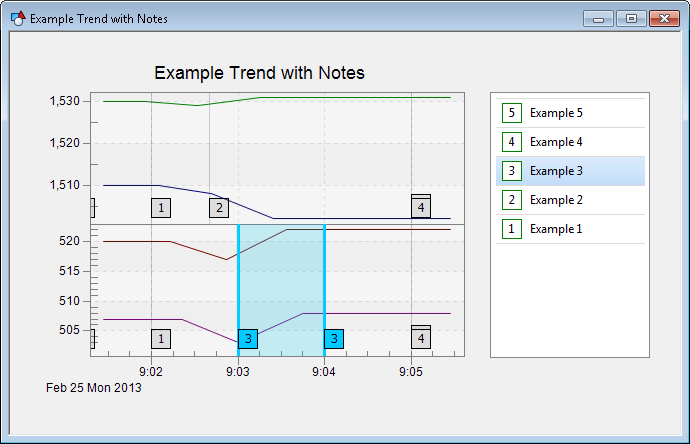
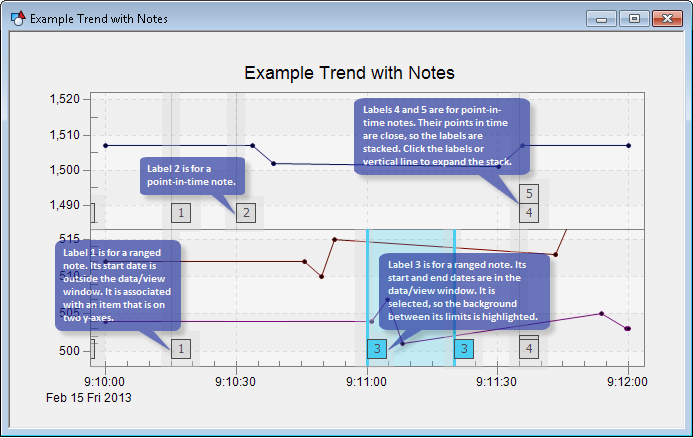
Although it is not an associated tool, you can also use the CygNet NOTE View Control. It is a replica of a specific Note Service that can be deployed on a CygNet Studio screen.
See also NOTE Scripting.
More:


